- BT Community
- /
- Broadband
- /
- ADSL/Copper broadband
- /
- Re: Intermittent fault, how to request open-reach ...
- Subscribe to this Topic's RSS Feed
- Mark Topic as New
- Mark Topic as Read
- Float this Topic for Current User
- Bookmark
- Subscribe
- Printer Friendly Page

- Mark as New
- Bookmark
- Subscribe
- Subscribe to this message's RSS Feed
- Highlight this Message
- Report Inappropriate Content
Intermittent fault, how to request open-reach checks?
I've had an intermittent fault on broadband for a couple of months. Following the trouble-shooter tells me it's found a "poor connection" with the BT smart hub, and "might have some connection stability issues. This can result in your connection dropping out." The only option then is to request an engineer visit. I have done that twice, first engineer said maybe the 240v extension the hub was plugged into might be the problem 😄 and the second replaced the hub to no avail. Symptom is that a few times a day the router loses its connection and the light on the front goes orange for a minute or so until it reconnects.
I've tried phoning and am currently in a 45 minute queue, so I'm wondering if there's a better way to get the next step rather than book a third BT engineer.
Thanks!

 imjolly
- Mark as New
- Bookmark
- Subscribe
- Subscribe to this message's RSS Feed
- Highlight this Message
- Report Inappropriate Content
Re: Intermittent fault, how to request open-reach checks?
I assume you are on FTTC so provided you are not on digital voice have you checked phone line is quiet with no interference?
Have you also tried connecting hub to test socket to eliminate problems with your faceplate
If you like a post, or want to say thanks for a helpful answer, please click on the Ratings 'Thumbs up' on left hand side.
If someone answers your question correctly please let other members know by clicking on ’Mark as Accepted Solution’.
- Mark as New
- Bookmark
- Subscribe
- Subscribe to this message's RSS Feed
- Highlight this Message
- Report Inappropriate Content
Re: Intermittent fault, how to request open-reach checks?
Hi, yes FTTC. Yes I tried those things, as did the engineers that visited.
imjolly
- Mark as New
- Bookmark
- Subscribe
- Subscribe to this message's RSS Feed
- Highlight this Message
- Report Inappropriate Content
Re: Intermittent fault, how to request open-reach checks?
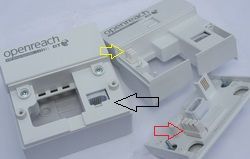
when you connected to test socket after removing faceplate did you use a new filter to connect the rj11 modem cable to the hub? did you try a different rj11 cable?
If you like a post, or want to say thanks for a helpful answer, please click on the Ratings 'Thumbs up' on left hand side.
If someone answers your question correctly please let other members know by clicking on ’Mark as Accepted Solution’.
