- BT Community
- /
- Broadband
- /
- BT Devices
- /
- Re: How do I check the model of my BT Whole Home d...
- Subscribe to this Topic's RSS Feed
- Mark Topic as New
- Mark Topic as Read
- Float this Topic for Current User
- Bookmark
- Subscribe
- Printer Friendly Page

- Mark as New
- Bookmark
- Subscribe
- Subscribe to this message's RSS Feed
- Highlight this Message
- Report Inappropriate Content
I have some ancient BT Whole Home disks and they can't match the speed of the 500Mb fibre we're contemplating. I bought some more that were described as AC2600 as they should be able to cope with the speeds. But they look the same as my old ones. I cannot see any text that would identify which version they are. I see that faster ones now have a different design. Is there a way to check which model I have?
Solved! Go to Solution.

- Mark as New
- Bookmark
- Subscribe
- Subscribe to this message's RSS Feed
- Highlight this Message
- Report Inappropriate Content
Re: How do I check the model of my BT Whole Home disk?
Hi
Discs are not built for speed, Purley to extend range
The BT smart hub 2 only works with the black Discs
On 500mbps with the smart hub two your only ever going to get around 200mbps over wifi.
Best going for the EE 500mbps which now offers the wifi 7 router on all its plan's at no extra cost

 Ali_A
Ali_A
- Mark as New
- Bookmark
- Subscribe
- Subscribe to this message's RSS Feed
- Highlight this Message
- Report Inappropriate Content
Re: How do I check the model of my BT Whole Home disk?
Hi @charlieheard
Can you post a photo of the front and back of the existing discs you have?
Ali
- Mark as New
- Bookmark
- Subscribe
- Subscribe to this message's RSS Feed
- Highlight this Message
- Report Inappropriate Content
Re: How do I check the model of my BT Whole Home disk?
Hi Ali
Sorry for the delay but the holidays got in the way...
Here's one of my old disks followed by one of the "new" disks:


- Mark as New
- Bookmark
- Subscribe
- Subscribe to this message's RSS Feed
- Highlight this Message
- Report Inappropriate Content
Re: How do I check the model of my BT Whole Home disk?
"The BT smart hub 2 only works with the black Disc"
Not exactly true
The SH2 will work with ANY WiFi extender units (including BT's white discs) that have the first unit connected by ethernet cable to the hub.
The BT black disks all connect by DECT to the hub so don't need the ethernet cable connection
Ali_A
- Mark as New
- Bookmark
- Subscribe
- Subscribe to this message's RSS Feed
- Highlight this Message
- Report Inappropriate Content
Re: How do I check the model of my BT Whole Home disk?
Hi @charlieheard
I hope you had a very pleasant Christmas season. Thanks for the images.
Please pull out the tab on the back of the disc at the top which says "pull out for useful info". This will reveal the details of the disc behind it.
For example: 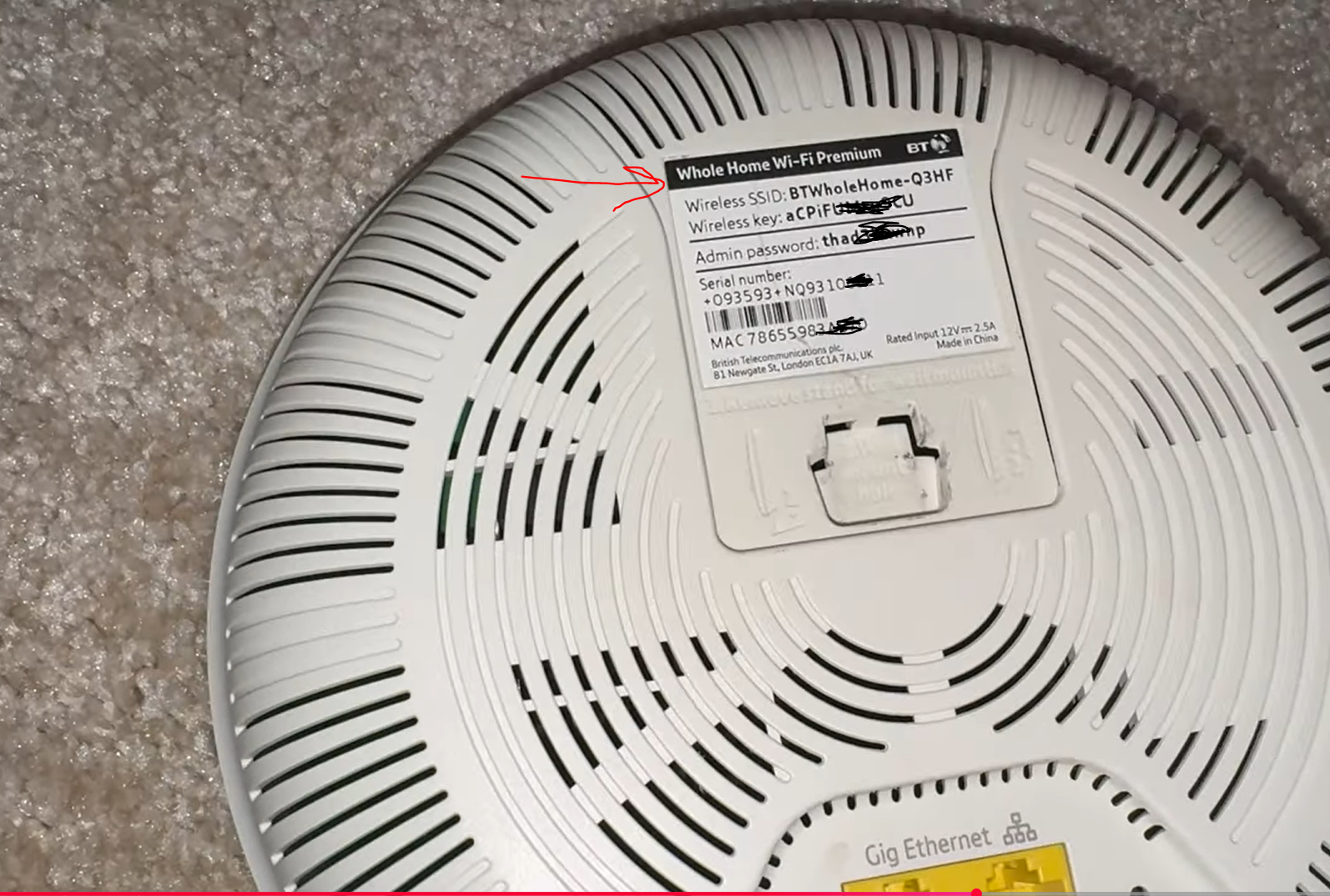
Ali
- Mark as New
- Bookmark
- Subscribe
- Subscribe to this message's RSS Feed
- Highlight this Message
- Report Inappropriate Content
Re: How do I check the model of my BT Whole Home disk?
Thanks - I hadn't realised there was more info there till I looked!
Old and "new" again

 Ali_A
Ali_A
- Mark as New
- Bookmark
- Subscribe
- Subscribe to this message's RSS Feed
- Highlight this Message
- Report Inappropriate Content
Thanks @charlieheard
It appears that both old and new discs you have are the same "Whole Home Wi-Fi" standard model.
You can find out more about the different models at BT Whole Home Wi-Fi Product Family
Ali

 licquorice
- Mark as New
- Bookmark
- Subscribe
- Subscribe to this message's RSS Feed
- Highlight this Message
- Report Inappropriate Content
Re: How do I check the model of my BT Whole Home disk?
@chrisjpwrote:"The BT smart hub 2 only works with the black Disc"
Not exactly true
Its the reverse, the Black discs only work with the SH2
The SH2 will work with ANY WiFi extender units (including BT's white discs) that have the first unit connected by ethernet cable to the hub.
The BT black disks all connect by DECT to the hub so don't need the ethernet cable connection
No, they connect via Wifi
