- BT Community
- /
- Home phone & Mobile
- /
- Home phone including Digital Voice
- /
- Re: Account closed during Digital Voice switchover
- Subscribe to this Topic's RSS Feed
- Mark Topic as New
- Mark Topic as Read
- Float this Topic for Current User
- Bookmark
- Subscribe
- Printer Friendly Page

- Mark as New
- Bookmark
- Subscribe
- Subscribe to this message's RSS Feed
- Highlight this Message
- Report Inappropriate Content
Account closed during Digital Voice switchover
My dad had been receiving numerous letter regarding the digital voice switchover and asked me to assist him with it. I followed the instructions on one of the letters and booked a date plus an engineer visit.
His new router arrived in plenty of time and the engineer came out yesterday and hooked it up. The internet is working fine but there is no dial tone on the phone. The engineer told me that I needed to phone BT to see why digital voice hadn’t been activated and then left. And that’s when the fun started.
I’ve made numerous calls to BT and used their chat function. For the first ten minutes of every call they can’t seem to find his account. They then find it and say it has been closed. When I point out that his internet was working they come to the conclusion that there must be another account but search for one and can’t find it.
They then go through the rigmarole of insisting that we must have switched broadband providers, which we absolutely have not. I point out that it is a massive coincidence that the date the account was closed is that date it should have been moved to digital voice. They said they sent an email out saying the account would be closed but it was sent to my mother who has been dead for six years.
I’ve been told that I need to speak to the orders team to reactivate the account but, again, they insist it has been transferred to another provider. They don’t see able to explain why a BT hub has just been sent out and a BT engineer came to fit it yesterday.
So at the moment, my elderly father has internet but no home phone, which is a big problem for him. I get no help whatsoever from BT and they are determined to blame him for a situation they have caused.
I would be most grateful if anyone could suggest what to do to get his phone working again. I’ve hit a brick wall.

 Katie_J
- Mark as New
- Bookmark
- Subscribe
- Subscribe to this message's RSS Feed
- Highlight this Message
- Report Inappropriate Content
Re: Account closed during Digital Voice switchover
Good afternoon @simonwxm.
Thanks for coming here.
I am sorry to hear about your recent experience when switching your father over to Digital Voice and concerned to hear that he currently has no landline. This is something I really want to see if I can help with.
When you have a moment please check your community inbox.
Katie
- Mark as New
- Bookmark
- Subscribe
- Subscribe to this message's RSS Feed
- Highlight this Message
- Report Inappropriate Content
Re: Account closed during Digital Voice switchover
How do I do that. I can’t see an inbox anywhere
Katie_J
- Mark as New
- Bookmark
- Subscribe
- Subscribe to this message's RSS Feed
- Highlight this Message
- Report Inappropriate Content
Re: Account closed during Digital Voice switchover
Hi @simonwxm.
I am having problems sending the private message.
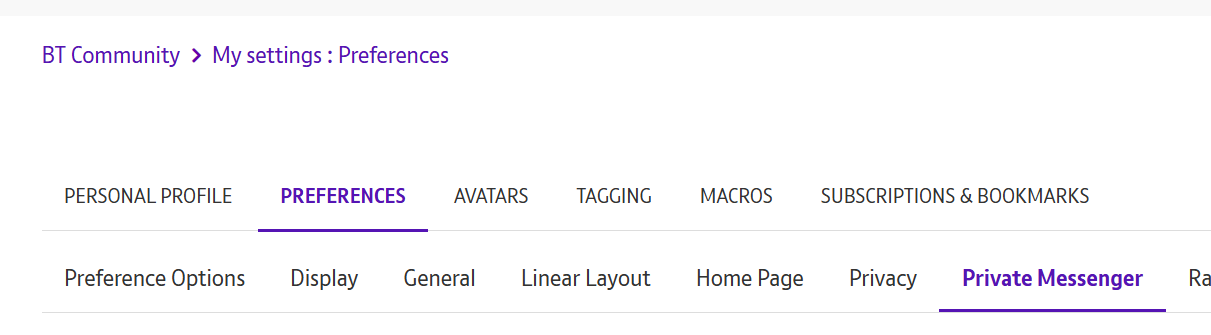
Can you please check in your community profile settings that you have private messages enabled?
This setting can be found by following these steps:
My settings > Preferences > Private Messenger > Ensure Turn on Private Messages is ticked.
Katie
- Mark as New
- Bookmark
- Subscribe
- Subscribe to this message's RSS Feed
- Highlight this Message
- Report Inappropriate Content
Re: Account closed during Digital Voice switchover
Katie_J
- Mark as New
- Bookmark
- Subscribe
- Subscribe to this message's RSS Feed
- Highlight this Message
- Report Inappropriate Content
Re: Account closed during Digital Voice switchover
Hi @simonwxm.
Have you clicked on your profile picture in the top right corner of the community?
The drop down for My Settings should be there.
Katie
- Mark as New
- Bookmark
- Subscribe
- Subscribe to this message's RSS Feed
- Highlight this Message
- Report Inappropriate Content
Re: Account closed during Digital Voice switchover
There is an option for My Settings and I’ve been through all the options under that and there is nothing about Private Messages.
This is yet another dead end.
Katie_J
- Mark as New
- Bookmark
- Subscribe
- Subscribe to this message's RSS Feed
- Highlight this Message
- Report Inappropriate Content
Re: Account closed during Digital Voice switchover
Hi @simonwxm.
Please be assured we are looking into this so we can get the private message to you.
Do you see this drop down for preferences?
Speak soon,
Katie
- Mark as New
- Bookmark
- Subscribe
- Subscribe to this message's RSS Feed
- Highlight this Message
- Report Inappropriate Content
Re: Account closed during Digital Voice switchover

Katie_J
- Mark as New
- Bookmark
- Subscribe
- Subscribe to this message's RSS Feed
- Highlight this Message
- Report Inappropriate Content
Re: Account closed during Digital Voice switchover
Hi @simonwxm.
I have now been able to successfully send the private message.
Please check your inbox when you have a moment.
Katie
