- BT Community
- /
- Broadband
- /
- Home setup, Wi-Fi & network discussions
- /
- Re: Techie question. How do you clear Hub Manager ...
- Subscribe to this Topic's RSS Feed
- Mark Topic as New
- Mark Topic as Read
- Float this Topic for Current User
- Bookmark
- Subscribe
- Printer Friendly Page

- Mark as New
- Bookmark
- Subscribe
- Subscribe to this message's RSS Feed
- Highlight this Message
- Report Inappropriate Content
All
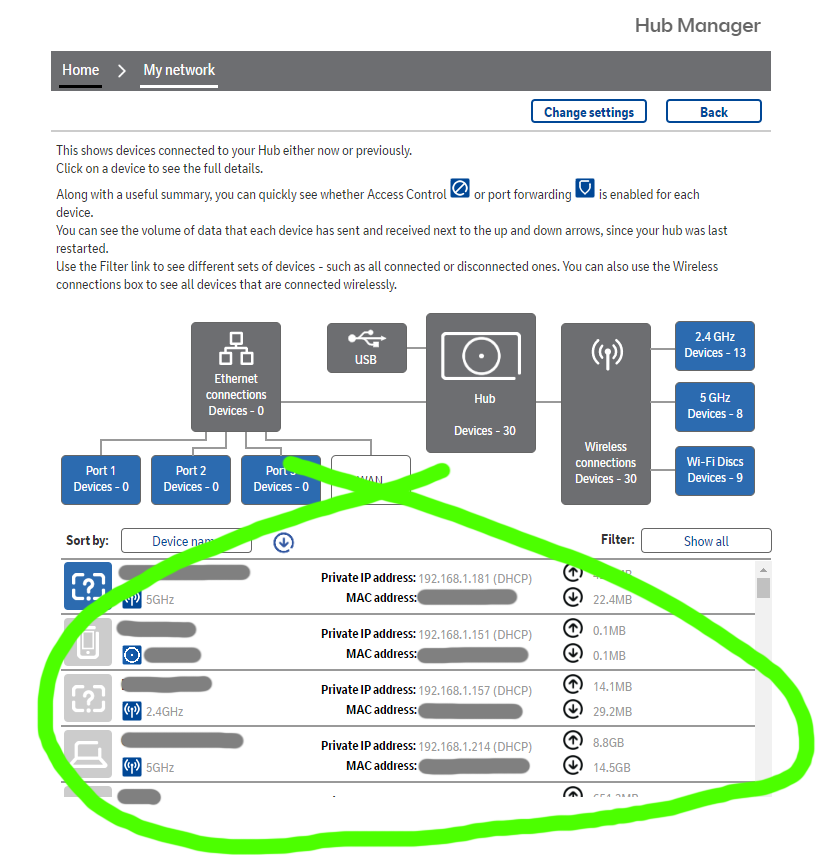
Techie question; how do I flush/clear the Hub Manage cache that is accesses via a browser? I've recently reset the hub itself, then set up again using the previous SSID/password and cache as not reset.
Thanks
Solved! Go to Solution.

 licquorice
- Mark as New
- Bookmark
- Subscribe
- Subscribe to this message's RSS Feed
- Highlight this Message
- Report Inappropriate Content
Re: Techie question. How do you clear Hub Manager (via browser) cache?
No idea why you would want to, but just highlight and delete the greyed entries.
- Mark as New
- Bookmark
- Subscribe
- Subscribe to this message's RSS Feed
- Highlight this Message
- Report Inappropriate Content
Re: Techie question. How do you clear Hub Manager (via browser) cache?
Thanks but manually trying to remove entries does not work, the hub/cache rejects the deletion - and they stay.

- Mark as New
- Bookmark
- Subscribe
- Subscribe to this message's RSS Feed
- Highlight this Message
- Report Inappropriate Content
Hi @User12345 I believe some of the devices (mine do) can retain the information, so you would have to reset them as well.
licquorice
- Mark as New
- Bookmark
- Subscribe
- Subscribe to this message's RSS Feed
- Highlight this Message
- Report Inappropriate Content
Re: Techie question. How do you clear Hub Manager (via browser) cache?
Factory reset the hub.
Still no idea why you want to remove the entries, the network map is a useless piece of junk.

- Mark as New
- Bookmark
- Subscribe
- Subscribe to this message's RSS Feed
- Highlight this Message
- Report Inappropriate Content
Re: Techie question. How do you clear Hub Manager (via browser) cache?
Well my hub has the wrong name against a Raspberry PI that I have repurposed. It now has a different host name, but presumably the BT Hub has matched its MAC address and used the cached hostname and DHCP IP address. I would like to show the current hostname.
licquorice
- Mark as New
- Bookmark
- Subscribe
- Subscribe to this message's RSS Feed
- Highlight this Message
- Report Inappropriate Content
Re: Techie question. How do you clear Hub Manager (via browser) cache?
See previous message.
- Mark as New
- Bookmark
- Subscribe
- Subscribe to this message's RSS Feed
- Highlight this Message
- Report Inappropriate Content
Re: Techie question. How do you clear Hub Manager (via browser) cache?
Well I fixed it.
The BT hub keeps the hostname alongside the MAC address for any device that connects to the hub.
They do disappear after a long time, but as there is no CLI interface for the hunb. its not possible to clear the cache.
The workaround I found was once identified on the hub with the wrong hostname, you can edit the entry from the My Network page and change the icon ( if wanted) and the hostname. Clicking save stores the name.
Thanks for the comments.

- Mark as New
- Bookmark
- Subscribe
- Subscribe to this message's RSS Feed
- Highlight this Message
- Report Inappropriate Content
Re: Techie question. How do you clear Hub Manager (via browser) cache?
Looking into this issue came across this post….,
Why would you not want to? Should I be concerned that everyone who has visited and connected to my wifi over the past few years still has an entry of sorts in my hub, including mac addresses and private ipaddresses.

- Mark as New
- Bookmark
- Subscribe
- Subscribe to this message's RSS Feed
- Highlight this Message
- Report Inappropriate Content
Re: Techie question. How do you clear Hub Manager (via browser) cache?
I’m not sure why that is a problem as you should be the only one that can see them.
A factory reset, by holding the button on the back in for 30 seconds, will clear the lot, but it will also drop the hub back to default settings. If you have any custom settings you will need to put them in again.
If it’s a Smart Hub 2, there is a configuration back up function, so you can export the settings and then reimport them again. I assume other models are similar.
