- BT Community
- /
- Archive
- /
- Archive Staging
- /
- Re: In Smart Hub 2 Manager the 'remove' button bes...
- Subscribe to this Topic's RSS Feed
- Mark Topic as New
- Mark Topic as Read
- Float this Topic for Current User
- Bookmark
- Subscribe
- Printer Friendly Page

- Mark as New
- Bookmark
- Subscribe
- Subscribe to this message's RSS Feed
- Highlight this Message
- Report Inappropriate Content
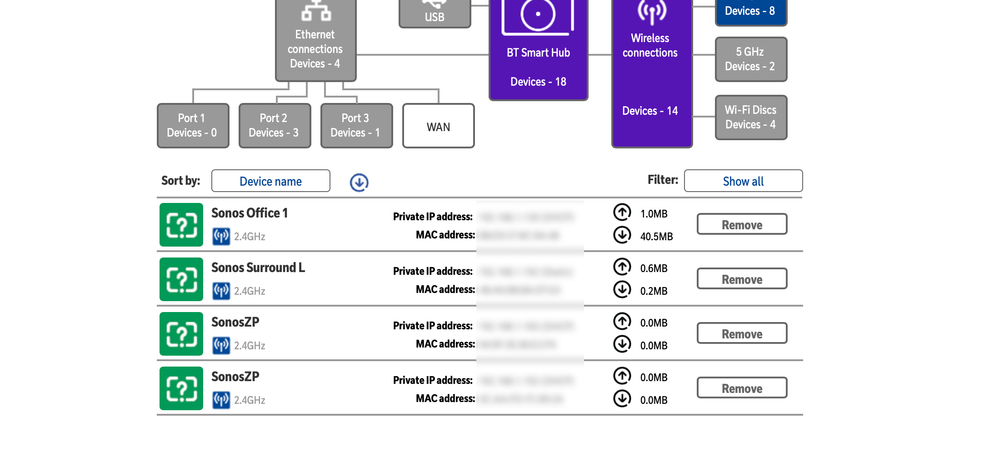
In Smart Hub 2 Manager the 'remove' button beside devices in My Network isn't working? I've tried Safari, Chrome, Firefox - I'm logged in as an administrator to 'make changes'. It just highlights with a blank click and no change.
Solved! Go to Solution.

 licquorice
- Mark as New
- Bookmark
- Subscribe
- Subscribe to this message's RSS Feed
- Highlight this Message
- Report Inappropriate Content
You can't 'remove' active (green) devices. All the remove function does is clean up the network map of devices no longer connected (grey).
- Mark as New
- Bookmark
- Subscribe
- Subscribe to this message's RSS Feed
- Highlight this Message
- Report Inappropriate Content
Re: In Smart Hub 2 Manager the 'remove' button beside devices in My Network isn't working?
Ah, a little bit annoying as I'm trying to clean up duplicate IP's of active devices. I'll try a workaround thanks.

- Mark as New
- Bookmark
- Subscribe
- Subscribe to this message's RSS Feed
- Highlight this Message
- Report Inappropriate Content
Re: In Smart Hub 2 Manager the 'remove' button beside devices in My Network isn't working?
Did you manage to solve this?
licquorice
- Mark as New
- Bookmark
- Subscribe
- Subscribe to this message's RSS Feed
- Highlight this Message
- Report Inappropriate Content
Re: In Smart Hub 2 Manager the 'remove' button beside devices in My Network isn't working?
Solve what?
- Mark as New
- Bookmark
- Subscribe
- Subscribe to this message's RSS Feed
- Highlight this Message
- Report Inappropriate Content
Re: In Smart Hub 2 Manager the 'remove' button beside devices in My Network isn't working?
In the sense it's just a limitation of the Smart Hub 2 Manager; You can only 'remove' inactive devices not 'active' ones
- Mark as New
- Bookmark
- Subscribe
- Subscribe to this message's RSS Feed
- Highlight this Message
- Report Inappropriate Content
Re: In Smart Hub 2 Manager the 'remove' button beside devices in My Network isn't working?
well I have a supposed active one but it is nothing I know about. By the time shown on last usage I think it is the second disc locked on 2.4GHz but it is actually active on 2.4GHz. I am trying to disconenct whatever it is on the 5.4 GHz. Any ideas
- Mark as New
- Bookmark
- Subscribe
- Subscribe to this message's RSS Feed
- Highlight this Message
- Report Inappropriate Content
Re: In Smart Hub 2 Manager the 'remove' button beside devices in My Network isn't working?
sorry that doesn't make sense. Should be :
well I have a supposed active one but it is nothing I know about. By the time shown on last usage I think it is the second disc locked on 5GHz but it is actually active on 2.4GHz. I am trying to disconnect whatever it is on the 5GHz. Any ideas
licquorice
- Mark as New
- Bookmark
- Subscribe
- Subscribe to this message's RSS Feed
- Highlight this Message
- Report Inappropriate Content
Re: In Smart Hub 2 Manager the 'remove' button beside devices in My Network isn't working?
Its just a list of connected/previously connected devices, you can't disconnect anything from there. All the 'Remove' button does is remove stale entries from the list.
- Mark as New
- Bookmark
- Subscribe
- Subscribe to this message's RSS Feed
- Highlight this Message
- Report Inappropriate Content
Re: In Smart Hub 2 Manager the 'remove' button beside devices in My Network isn't working?
But it is shown as "green" and not "grey"
