- BT Community
- /
- Broadband
- /
- BT Fibre broadband
- /
- Re: Possible error on line or put into banded pro...
- Subscribe to this Topic's RSS Feed
- Mark Topic as New
- Mark Topic as Read
- Float this Topic for Current User
- Bookmark
- Subscribe
- Printer Friendly Page
- « Previous
-
- 1
- 2
- Next »

- Mark as New
- Bookmark
- Subscribe
- Subscribe to this message's RSS Feed
- Highlight this Message
- Report Inappropriate Content
Re: Possible error on line or put into banded profile. How to fix?
@imjolly I'm afraid I'm not sure what you mean by use text socket.

 licquorice
- Mark as New
- Bookmark
- Subscribe
- Subscribe to this message's RSS Feed
- Highlight this Message
- Report Inappropriate Content
Re: Possible error on line or put into banded profile. How to fix?
The mods here no longer have account access unfortunately.
I'm afraid you need to persevere with customer services, they should be able to see you have a line fault. Don't tell them you have a connection.
licquorice
- Mark as New
- Bookmark
- Subscribe
- Subscribe to this message's RSS Feed
- Highlight this Message
- Report Inappropriate Content
Re: Possible error on line or put into banded profile. How to fix?
@YetiWakeswrote:@imjolly I'm afraid I'm not sure what you mean by use text socket.
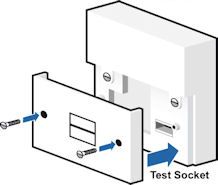
If you remove the faceplate of the master socket, there will be a test socket behind it.
 imjolly
- Mark as New
- Bookmark
- Subscribe
- Subscribe to this message's RSS Feed
- Highlight this Message
- Report Inappropriate Content
Re: Possible error on line or put into banded profile. How to fix?
I assume your router i s connected to the mastersocket so if you remove the front plate you should see the test socket behind. You will need an old style filter to plug in to test socket then connect router
If you like a post, or want to say thanks for a helpful answer, please click on the Ratings 'Thumbs up' on left hand side.
If someone answers your question correctly please let other members know by clicking on ’Mark as Accepted Solution’.
- Mark as New
- Bookmark
- Subscribe
- Subscribe to this message's RSS Feed
- Highlight this Message
- Report Inappropriate Content
Re: Possible error on line or put into banded profile. How to fix?
Ok understand now with test socket. Thought text was something else to do with old analogue line or something.
Engineers no longer help on this forum? That's rubbish, was only thing that I kept telling myself was helpful about BT, a way to get through to someone that could actually help. Now that's gone will somehow have to get problem fixed and then bin BT off I think. Not worth it for price and lack of support.
Thanks for the help. All round more depressing news than I thought at start of evening.
- Mark as New
- Bookmark
- Subscribe
- Subscribe to this message's RSS Feed
- Highlight this Message
- Report Inappropriate Content
Re: Possible error on line or put into banded profile. How to fix?
@imjolly thanks for clarification. Unfortunately I don't have a filter anymore.
Surprised if it is master socket which has gone wrong. Stuck behind a Welsh dresser and nothing has touched it in 4 years since last time there was a problem. I'm assuming if it's master socket playing up I'm liable for costs of engineer visit etc as cabling broken inside my property? Even though I've done nothing to it and last person to touch it was BT engineer who installed it last time I had a problem?
- Mark as New
- Bookmark
- Subscribe
- Subscribe to this message's RSS Feed
- Highlight this Message
- Report Inappropriate Content
Re: Possible error on line or put into banded profile. How to fix?
Just an update on this. Found a filter in the cupboard and things lot better using test socket.
Router stats are:

So does this mean problem is with my internal wiring or faceplate on master socket or something else. Tempted to just leave it stuck into test socket.
licquorice
- Mark as New
- Bookmark
- Subscribe
- Subscribe to this message's RSS Feed
- Highlight this Message
- Report Inappropriate Content
Re: Possible error on line or put into banded profile. How to fix?
Yep, the problem lies within your internal wiring or the master socket. If the fronplate of your master socket just clips on rather than screwed it is often the source of the problem. Try replacing the front plate and see if simply removing and replacing it has resolved the problem. Otherwise there is no problem with leaving your router connected to the test socket other than the aesthetics.
- Mark as New
- Bookmark
- Subscribe
- Subscribe to this message's RSS Feed
- Highlight this Message
- Report Inappropriate Content
Re: Possible error on line or put into banded profile. How to fix?
Thanks for the clarification.
I'll try another faceplate at some point. No problem with the aesthetics, the master socket is stuck behind a Welsh dresser full of books. That was why I was reluctant to investigate problem to start with, it weights a 100 tonne and is a p.i.a to move.

- Mark as New
- Bookmark
- Subscribe
- Subscribe to this message's RSS Feed
- Highlight this Message
- Report Inappropriate Content
Re: Possible error on line or put into banded profile. How to fix?
If you look at your non BT router stats before the ‘fix’ and after (that in itself is a reason why support may be somewhat lacking , if you chose to use your own router rather that the BT supplied one, BT only supports their own equipment ) ..your line attenuation was massive when you first posted the router stats (50+dB ) and now around 10bB , so you obviously fixed the issue yourself.
- « Previous
-
- 1
- 2
- Next »
