- BT Community
- /
- Broadband
- /
- Home setup, Wi-Fi & network discussions
- /
- Re: Accessing local network
- Subscribe to this Topic's RSS Feed
- Mark Topic as New
- Mark Topic as Read
- Float this Topic for Current User
- Bookmark
- Subscribe
- Printer Friendly Page
- « Previous
-
- 1
- 2
- Next »

- Mark as New
- Bookmark
- Subscribe
- Subscribe to this message's RSS Feed
- Highlight this Message
- Report Inappropriate Content
Re: Accessing local network
It's a six year old TV with a few built-in apps but AFAIK you can't install any more.

- Mark as New
- Bookmark
- Subscribe
- Subscribe to this message's RSS Feed
- Highlight this Message
- Report Inappropriate Content
Re: Accessing local network
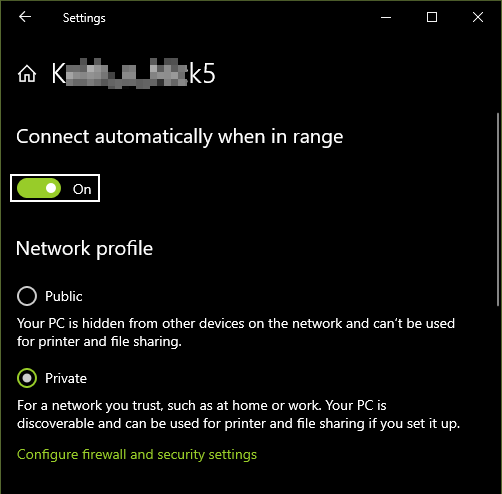
In your settings the connection is definitely showing as private here:
Whole house, garden, garage and half the street covered by a Flint 4 - WiFi 7 router
- Mark as New
- Bookmark
- Subscribe
- Subscribe to this message's RSS Feed
- Highlight this Message
- Report Inappropriate Content
Re: Accessing local network
Oh My!! I recently had to reinstall Win 10 Pro and everything, including my LAN, has been working just fine. So I was shocked when I checked it after your post to find it's actually Public. Too late tonight to start anything and we're away through most of tomorrow so it will have to wait, but thanks a million for asking me to check it.
- Mark as New
- Bookmark
- Subscribe
- Subscribe to this message's RSS Feed
- Highlight this Message
- Report Inappropriate Content
Success! After switching from Teamviewer to Remote Desktop Connection, resetting my network to Private, and setting up Windows Media Player on the Win 10 PC upstairs I was immediately able to use my laptop to cast my music from the PC to the TV in the downstairs lounge and it sounded pretty good through the Bose soundbar. Complete WiFi clearly works pretty good in this largish house.
I had no idea how to achieve any of this before asking here - much thanks to all!
- Mark as New
- Bookmark
- Subscribe
- Subscribe to this message's RSS Feed
- Highlight this Message
- Report Inappropriate Content
Re: Accessing local network
The dialogue that flashes up when a Windows PC connects to a new network is poorly thought out, so its VERY common for people to fall foul of this!
Glad we helped to get you sorted 🙂
Whole house, garden, garage and half the street covered by a Flint 4 - WiFi 7 router

- Mark as New
- Bookmark
- Subscribe
- Subscribe to this message's RSS Feed
- Highlight this Message
- Report Inappropriate Content
Re: Accessing local network
Hi @Earthling,
Thank you for posting back to update the thread. I'm glad you managed to get that sorted 🙂
Thanks,
Paddy


- « Previous
-
- 1
- 2
- Next »
