- BT Community
- /
- Broadband
- /
- Home setup, Wi-Fi & network discussions
- /
- Printer connection
- Subscribe to this Topic's RSS Feed
- Mark Topic as New
- Mark Topic as Read
- Float this Topic for Current User
- Bookmark
- Subscribe
- Printer Friendly Page

- Mark as New
- Bookmark
- Subscribe
- Subscribe to this message's RSS Feed
- Highlight this Message
- Report Inappropriate Content
Hi.
I recently upgraded to BT Halo 3 and now my HP Deskjet 2700e printer won't connect.
HP have confirmed it's a network connection problem and to contact my provider.
I am using the HP Smart Service App on an android phone for wireless connection.
The printer is paired to my network but not connecting.
Please can you help.
Thank you
Julie
Solved! Go to Solution.

- Mark as New
- Bookmark
- Subscribe
- Subscribe to this message's RSS Feed
- Highlight this Message
- Report Inappropriate Content
Hi @Juliefoley72 welcome to the community and thanks for posting. Some printers can't differentiate between the 2.4 and 5Ghz Wifi channels. I'd recommend logging into the Hub Manager and temporarily turning off the 5 GHz channel. Then follow the steps to connect your printer, once its connected go back to the Hub manager to enable the 5GHz channel again.
- Open a new web browser
- Type 192.168.1.254 into the address bar
- Click Advanced Settings and log in using the Admin details on the back of your Hub.
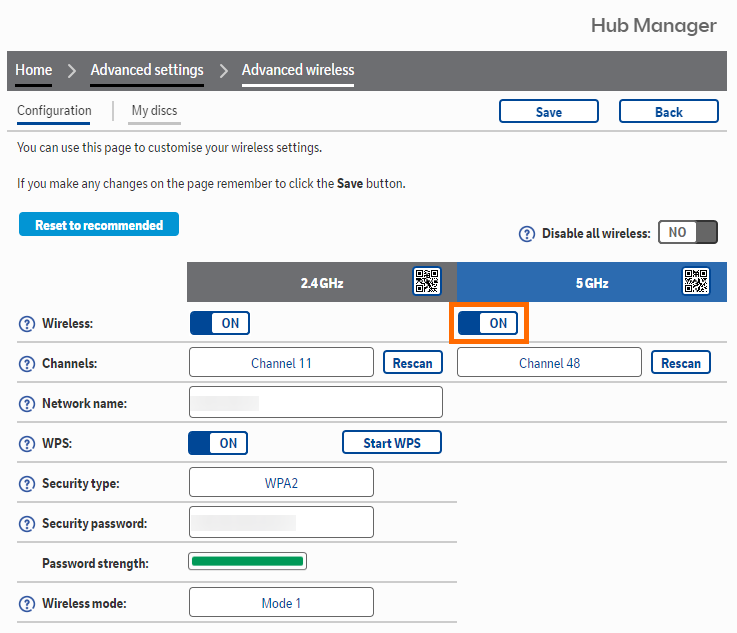
Thanks
Neil




 gg30340
- Mark as New
- Bookmark
- Subscribe
- Subscribe to this message's RSS Feed
- Highlight this Message
- Report Inappropriate Content
Re: Printer connection
Did you reset your printer and log it onto your BT hub.
Alternatively if you received a new BT hub and you have installed that you could go into the hubs settings and change its SSID (name) and password to the same as your old hub and your printer and other wireless device would be none the wiser and just connect to the new hub "thinking" it is the old hub.
- Mark as New
- Bookmark
- Subscribe
- Subscribe to this message's RSS Feed
- Highlight this Message
- Report Inappropriate Content
Re: Printer connection
Thank you, all sorted.

- Mark as New
- Bookmark
- Subscribe
- Subscribe to this message's RSS Feed
- Highlight this Message
- Report Inappropriate Content
Re: Printer connection
Hi is it necessary to switch back to the 5 GHz and what happens if there is a power cut will I need to do all of this again
gg30340
- Mark as New
- Bookmark
- Subscribe
- Subscribe to this message's RSS Feed
- Highlight this Message
- Report Inappropriate Content
Re: Printer connection
@Llinoswrote:Hi is it necessary to switch back to the 5 GHz and what happens if there is a power cut will I need to do all of this again
No. A power cut will not reset it.
A power cut is just like turning off a device.
You should however turn on the 5GHz after your devices has made the connection on 2.4GHz. Again if you do this it will not need re-done after a power cut.
- Mark as New
- Bookmark
- Subscribe
- Subscribe to this message's RSS Feed
- Highlight this Message
- Report Inappropriate Content
Re: Printer connection
No luck with the fix I'm afraid all my other devices have automatically connected using the 2.4
I have tried everything the printer brings the hub up just will.not connect either using the password or the hub button. It's getting above my pay grade now! I'm not completely stupid but cannot think of anything else to try
 licquorice
- Mark as New
- Bookmark
- Subscribe
- Subscribe to this message's RSS Feed
- Highlight this Message
- Report Inappropriate Content
Re: Printer connection
You have just dived in to a 3 year old post and haven't explained what your problem actually is, what you tried, whether the printer is new, whether the hub is new etc etc. A bit more detail might give us a clue.
- Mark as New
- Bookmark
- Subscribe
- Subscribe to this message's RSS Feed
- Highlight this Message
- Report Inappropriate Content
Re: Printer connection
The printer is an old printer HP 8610 office jet pro. I have successfully connected it to previous hubs no problem. I was sent a new hub because the other one stopped working after the thunderstorm.
The new hub is 5 GHz I have checked on the app and my HP computer my mobile and two Alex a speakers are connected with 2.5 GHz
The printer shows the hub but will not connect with the password or the button on the hub.
licquorice
- Mark as New
- Bookmark
- Subscribe
- Subscribe to this message's RSS Feed
- Highlight this Message
- Report Inappropriate Content
Re: Printer connection
The new hub is dual band, 5Ghz and 2.4Ghz. If the printer can see the hub, the problem is not band related. Try a factory reset of the printer and set it up from scratch.
